DREAM pacing simulation example
See code in GitLab.
Author: Tobias Gerach tobias.gerach@kit.edu, Stephanie Appel stephanie.appel@kit.edu
This example demonstrates how to use the Diffusion Reaction Eikonal Alternant Model (DREAM). To run the experiments of this example, navigate to:
cd ${EXAMPLES}/03_Eikonal/03A_DREAM_pacingIntroduction
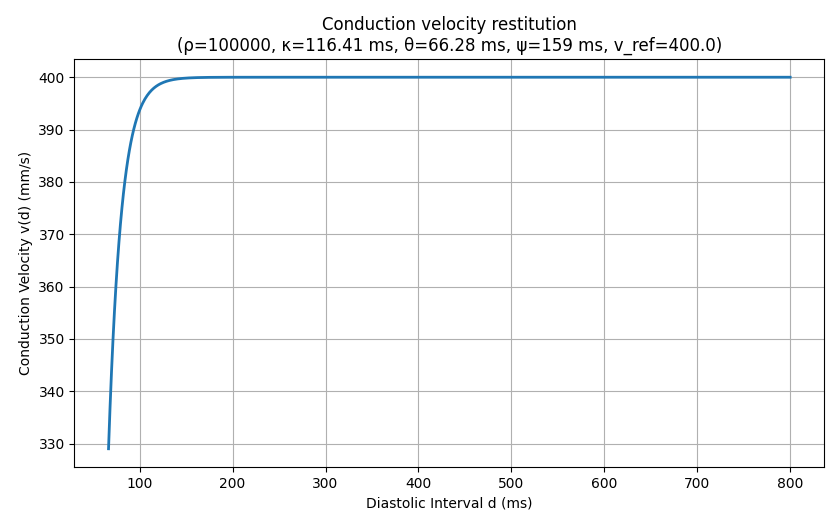
In this example, we will explore how the Diffusion Reaction Eikonal Alternant Model (DREAM) behaves during pacing protocols. During pacing protocols, an important characteristic of cardiac tissue is restitution. For the DREAM, we want to look at conduction velocity (CV) restitution in particular. Typically, CV reduces when the pacing frequency is increased.
Data output
Unlike the Eikonal and Reaction-Eikonal model, the DREAM runs in a cyclical manner, i.e. the eikonal equation is solved multiple times in alteration with the reaction part of the parabolic system.
Therefore, the .igb files for activation and repolarization times are updated in cycles as well.
Saving this data as .igb files has the advantage that you can easily visualize these files in meshalyzer.
However, you have to interpret the typical time step slider as eikonal computation cycles instead.
I recommend to set the color scale to auto if you do this.
Another advantage is that you can use the IGB tools in carputils to postprocess these files however you want.
If you are more interested in the local activation times based on transmembrane voltages, you can still use the traditional way of detecting activation times in openCARP by using the LAT sentinel.
Problem setup
Mesh
First, we build a geometry for this experiment using mesher.
The mesh is a simple 80mm by 50mm slab, which is discretized using triangles.
The mesh length (in the direction of propagation) can be adjusted using --length, which we make use of in task 4.
Ionic model
This example uses the Courtemanche legacy ionic model for human atrial myocytes [Courtemanche1998].
We use a version of the model with modified ion channel conductances using the -imp_region[].im_param parameter according to [Loewe2016].
To switch between a healthy and AF parameterization, use the option --AF or --no-AF, respectively.
Pacing protocol
We apply a stimulus on the left edge of the mesh.
With the option --bcl, the user can set the basic cycle length.
The number of cycles is set to 3.
Usage
The following optional arguments are available (default values are indicated):
python3 ./run.py --help
...
Example specific options:
--dx DX               Set resolution of the mesh in um (default: 1000.0)
--cv CV               Set conduction velocity in mm/s in fiber direction (default: 400.0)
--ar AR               Set anisotropy ratio perpendicular to fiber direction. (default: 1.0)
--bcl BCL             Set the basic cycle length for the stimulation. (default: 250)
--model {0,1,2,3}     Choose model to solve: Eikonal(0), RE+(1), RE-(2), DREAM(3) (default: 3)
--tau_inc TAU_INC     Maximum allowed increment of minimum activation time in every DREAM cycle. (default: 100.0)
--length LENGTH       Set the length of the mesh in x-direction in mm. (default: 80.0)
--AF, --no-AF         Determine if you want to use Courtemanche_legacy with remodelled ionic channels (--AF) or using the default
                      Courtemanche_legacy (--no-AF). (default: None)
After running the script, activation time, repolarization time, diffusion current and transmembrane voltage are output to the files act.igb, rpt.igb, idiff.igb, and vm.igb, respectively.
Running the script with the parameter --visualize will open the transmembrane voltage file in meshalyzer after the simulation is done.
Tasks
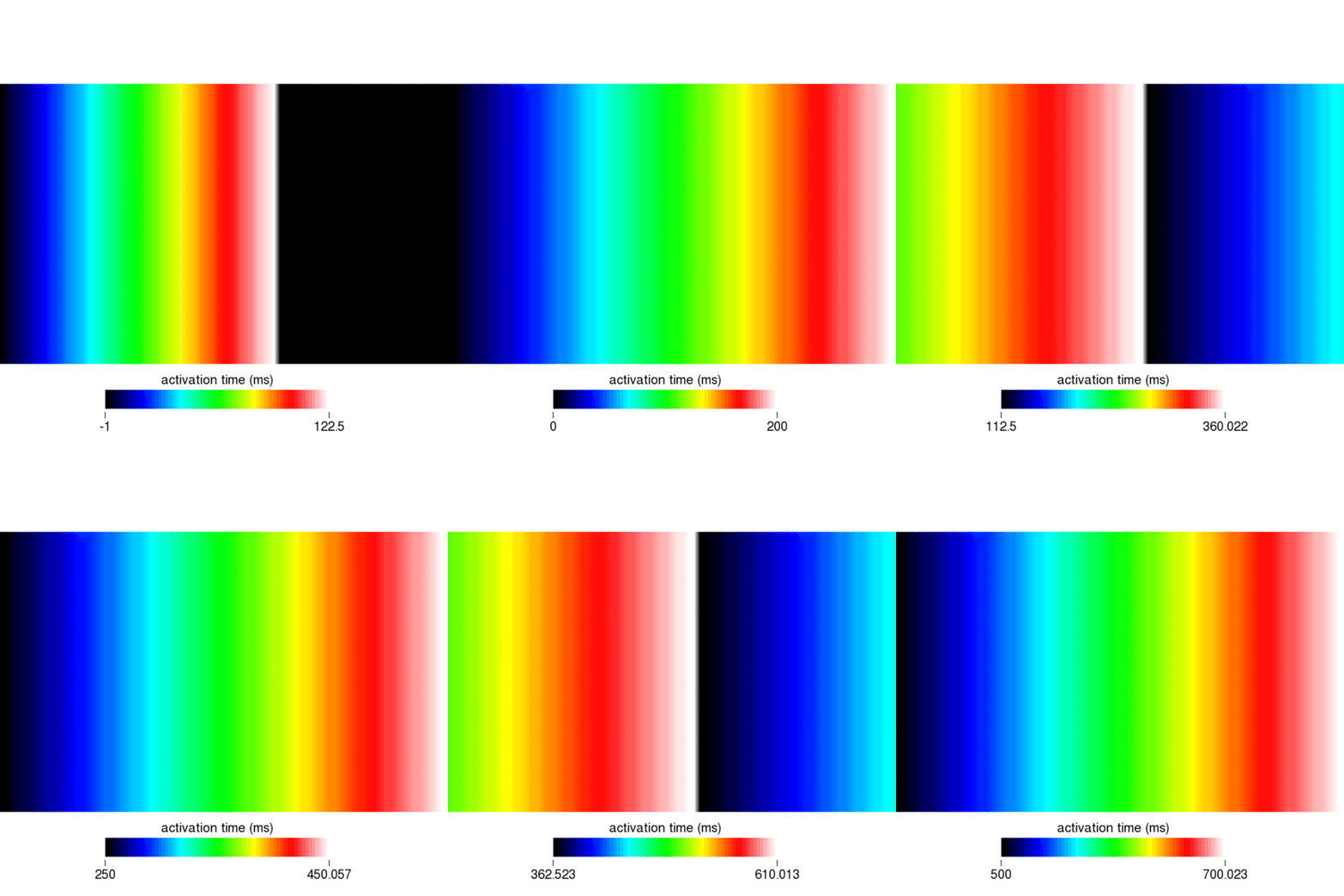
- Familiarize yourself with the output of the DREAM by visualizing activation times, repolarization times, and transmembrane voltage using meshalyzer.
2. Using our simple 2D mesh in an isotropic setting, we can calculate the activation times that are solutions to the eikonal equation with the relation \(t = d/v\), where \(d\) is the distance travelled and \(v\) is the CV.
Since we simulate a planar wavefront, the distance \(d\) is 80 mm at the right edge of the mesh.
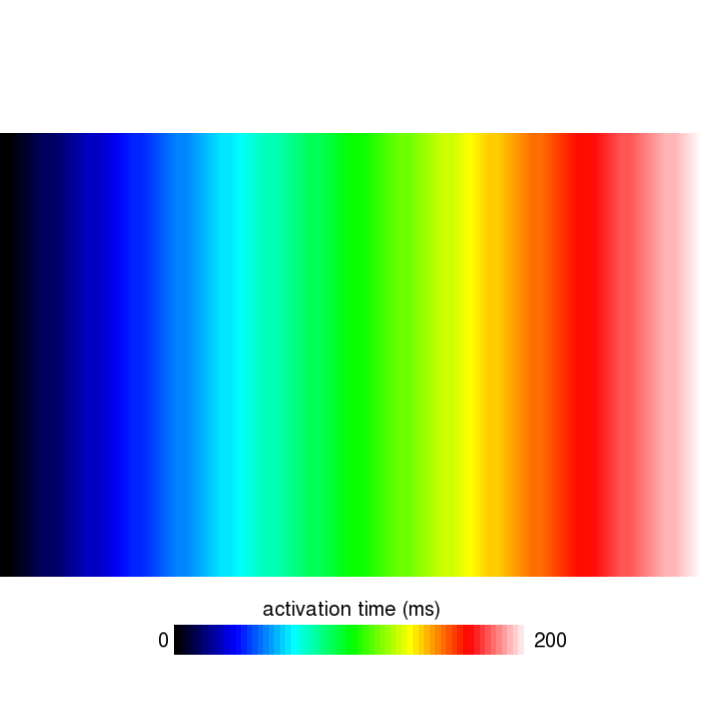
Using a CV of 400 mm/s, this should result in an activation time of 200 ms for the first stimulus.
Confirm this result by running the corresponding simulation with a BCL of 300 ms and the --AF option.
- How does the travel time (activation time - stimulus time) on the right edge change for the 2nd and 3rd stimulation if you use a BCL of 150 ms?
4. Using the same runtime options as in task 2, but with a longer mesh via --length 300 (instead of the default 80mm), run the simulation three times: with --tau_inc 150, --tau_inc 290, and --tau_inc 350.
What happens to the wavefront propagation triggered by the later stimuli in each case?
Solutions to the tasks
- Simply running the following command will visualize the transmembrane voltage in meshalyzer.
python3 run.py --visualizeEverything should be as you know it from bidomain or monodomain simulations. To open the eikonal activation times, click on File, Read Data and navigate to the directory eik_3_AF to open the file act.igb. Set the color scale to auto for best viewing and scroll through the eikonal cycles using the time slider. You should see something like this:
Similarly, you can visualize the repolarization times which are calculated when Vm crosses the threshold set by the dream parameter dream.repol_time_thresh.
- Using the command
python3 run.py --visualize --cv 400 --bcl 300 --AFwe can open the file act.igb as described in the solution to task 1. As shown in the following figure, pick a vertex on the right edge of the mesh and step through the eikonal cycles: its activation time will read 200ms, 500ms, and 800ms as the wavefronts from the 1st, 2nd, and 3rd stimulus arrive, respectively.
- Using the command
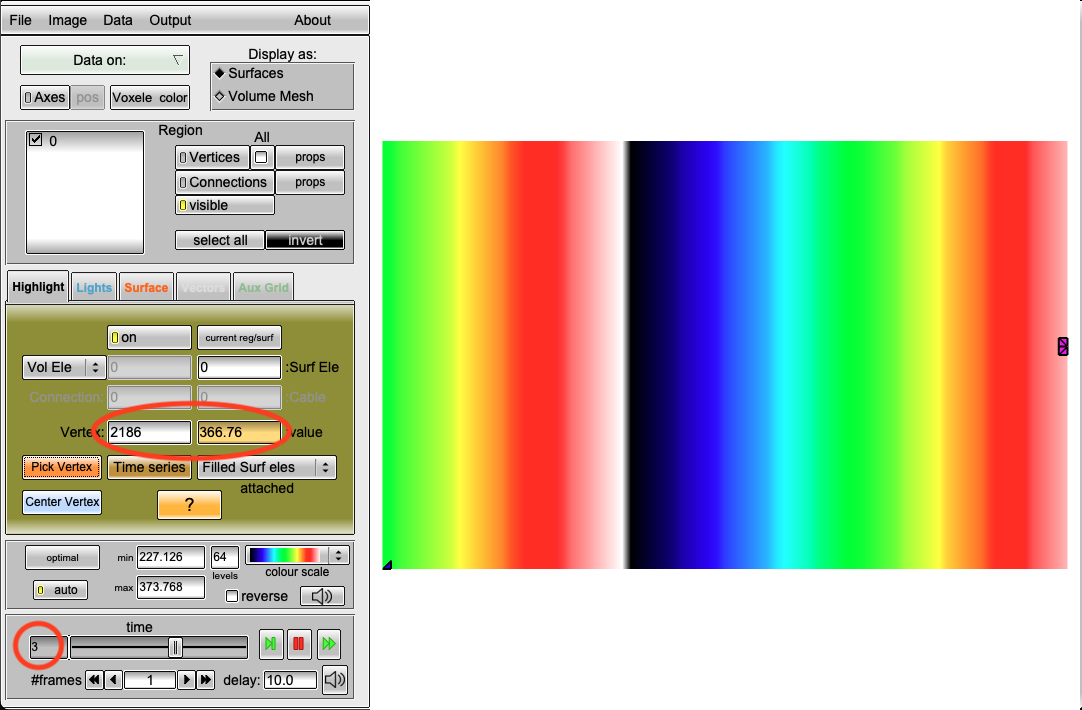
python3 run.py --visualize --cv 400 --bcl 150 --AFwe can open the act.igb file, pick a vertex on the right edge, and step through the eikonal cycles: after the 1st stimulus we still observe a travel time of 200ms, but after the 2nd and 3rd stimulus the right edge activates at 366.77ms and 512.99ms, giving travel times of \(366.77-150 = 216.77\) ms and \(512.99-300 = 212.99\) ms, respectively. Clearly, the conduction velocity is lower (approx. 377mm/s) after the second and third stimulus. This is expected and a result of the DREAM adhering to the CV restitution curve shown in the beginning.
- Using the commands
python3 run.py --visualize --cv 400 --bcl 300 --AF --length 300 --tau_inc 150
python3 run.py --visualize --cv 400 --bcl 300 --AF --length 300 --tau_inc 290
python3 run.py --visualize --cv 400 --bcl 300 --AF --length 300 --tau_inc 350
gives three different outcomes.
With tau_inc 150, the wavefronts from the second and third stimulus propagate correctly across the whole mesh.
With tau_inc 290, all stimuli fire, but the wavefronts from the 2nd and 3rd stimulus stop abruptly partway across the mesh (conduction blocks with no physiological cause).
With tau_inc 350, the second stimulus fails to activate anywhere at all.
tau_inc sets a limit on how far the eikonal solver is allowed to run ahead in one go before the simulation pauses to update the actual cell model with what really happened over that period.
That pause matters because it is the only point where the simulation checks how far each activated cell has recovered.
Here, the 300mm mesh takes 750ms for a single wave to cross, much longer than the 300ms between stimuli, so with a large enough tau_inc, the solver can still be computing activation times for the first stimulus's propagating wavefront, without having paused to update the cell model yet, when the second one is due.
The difference between the two failure modes comes down to timing: if the solver happens to pause just before reaching the second stimulus's scheduled time, the second stimulus itself fires correctly, but its wavefront then runs into tissue the solver has not refreshed yet and blocks there.
If the solver does not pause until after the second stimulus was already due, the second stimulus never gets a chance to fire at all.
This is also why the smaller 80mm mesh setup does not show this: a wave there only takes 200ms to cross, comfortably less than the 300ms between stimuli, so the solver always finishes its sweep and updates the cell model before the next stimulus is due.
A good rule of thumb is to choose tau_inc smaller than half of your BCL.
Recent questions tagged experiments, examples, tissue, eikonal
There are tagged with experiments, examples, tissue, eikonal.
Here we display the 5 most recent questions. You can click on each tag to show all questions for this tag.
You can also ask a new question.